AI Dance Generator: Turn a Photo into a Dance Video
An AI dance generator takes one picture of a person and asks the model to move them as if music were playing. That photo to dance clip is a few seconds of simple, rhythmic movement, such as a sway, a bounce or arms raised overhead, which these models handle far better than a choreographed routine. Start with a full-body photo of one person, keep the moves basic, and you get a 5 to 10 second MP4 to post or loop.
Examples
Each clip starts from a single photo. Click Play on a picture to watch it. The caption is the title and the prompt.
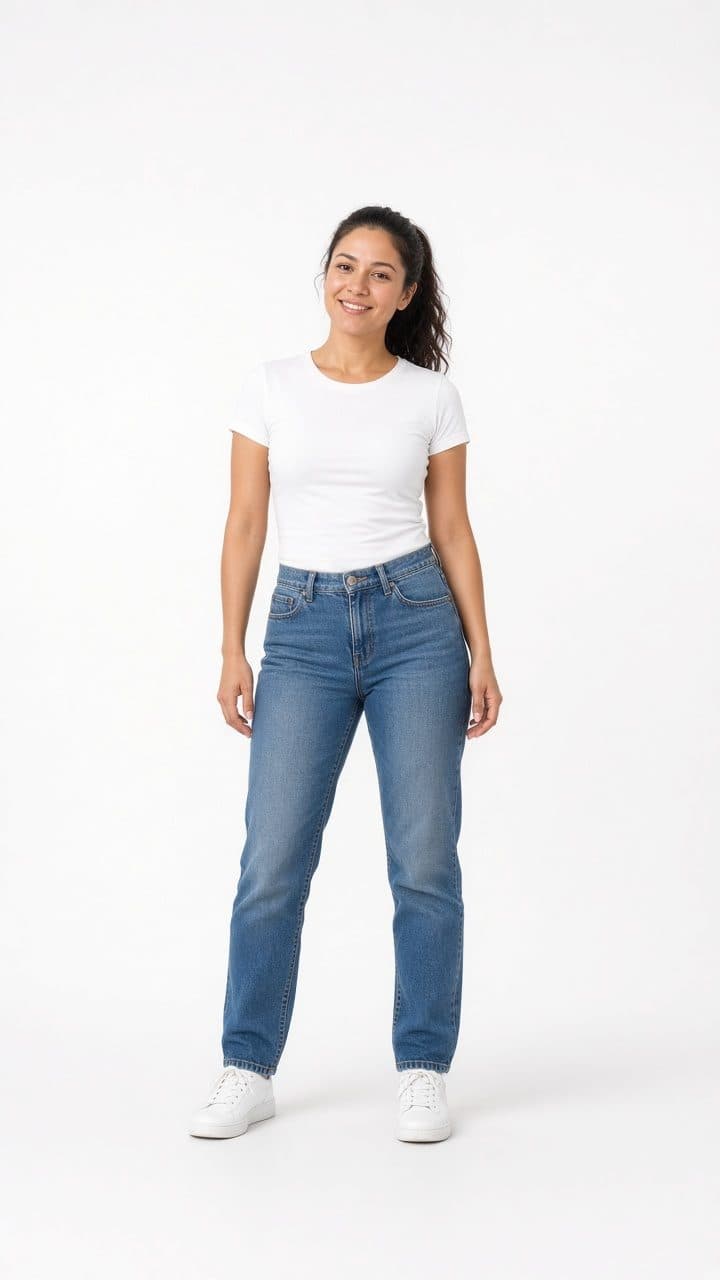
Studio Dance Groove“She dances a smooth upbeat hip-hop groove with flowing arm waves and stepping footwork, keeping a natural smile, static camera, her full body from head to shoes stays in frame the entire time, photorealistic motion, no text, no logos, no watermark” 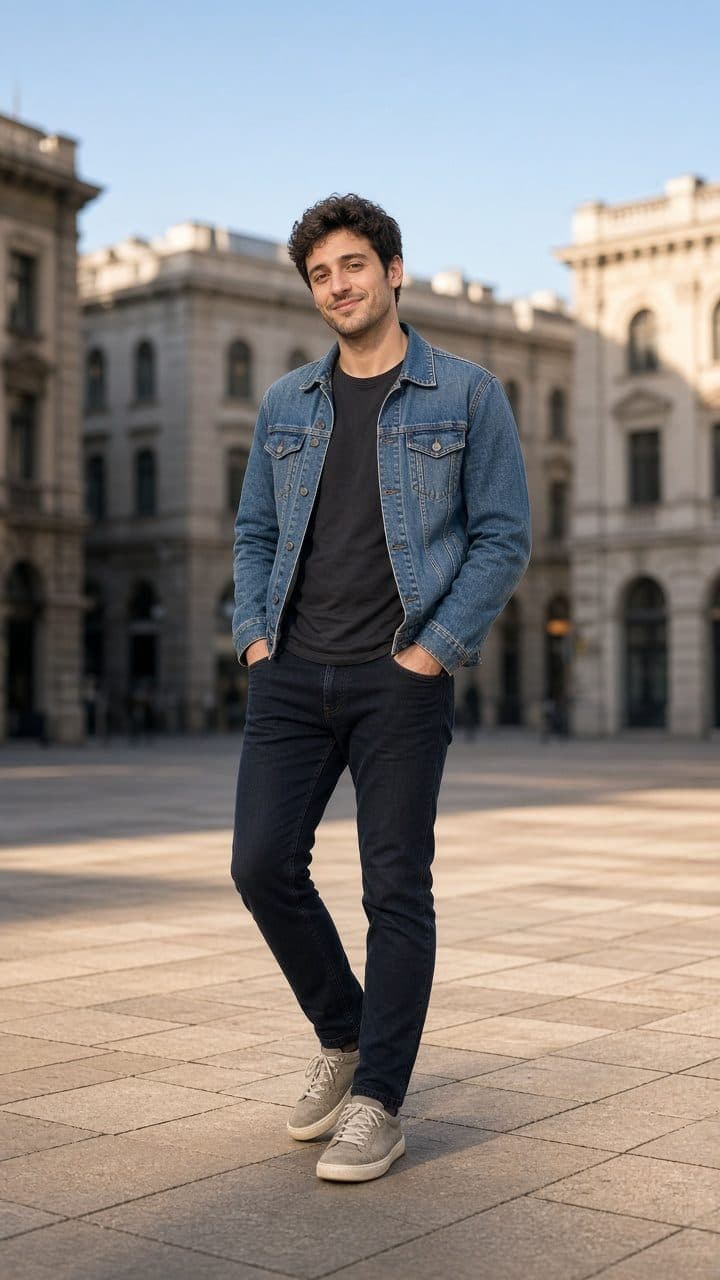
Plaza Footwork Dance“He takes his hands out of his pockets and does a fun footwork dance with a spin, keeping a playful smile, static camera, his full body from head to shoes stays in frame the entire time, photorealistic motion, no text, no logos, no watermark”
What an AI dance generator can do
The model generates the person’s body moving over the length of the clip, starting from the pose in your photo. It has no music to follow. It cannot hear a beat, and the downloaded clip is silent, so rhythm comes only from your words, like “bounces to the beat” or “sways side to side”. Simple, repeated movements look convincing. Fast spins, jumps, floor work and anything that hides and then reveals the arms tend to produce smeared limbs, extra hands or a face that changes mid-turn. Think of the result as a short, playful loop rather than a dance video you would film.
Choosing the right photo
- Full body, head to feet. The model can’t dance with legs it can’t see. A waist-up photo will mostly produce shoulder and arm movement.
- One person. A second person in the frame often starts moving too, or the two merge where they overlap.
- Space around them. Leave room on both sides so arms and legs don’t run off the edge. A vertical photo of someone standing in the middle, cropped to 9:16, is ideal.
- A plain background. Busy scenes give the model more to warp when the body moves.
- A relaxed standing pose. Arms loose and visible, not crossed or in pockets, give the model a clean starting point.
Photos that tend to fail
Dance asks the model to invent a lot of body, so the photo has more ways to fail than a portrait does.
| Photo | Why it fails | What to do instead |
|---|---|---|
| Two or more people | Each extra person doubles the limbs to track, and bodies that overlap can fuse. | Start with one person, with empty space on both sides. |
| Body too small in a wide shot | Joints that are only a few pixels wide get redrawn differently on every frame. | Crop so the dancer is large and centered, with the whole body still in frame. |
| Fast hands, claps overhead or finger poses | Hands leave the outline of the body and come back with extra fingers or smeared edges. | Keep the hands close to the torso and the move slow. |
| Low resolution, or motion blur already in the photo | There is no clean edge to follow, so arms and legs turn into streaks. | Use a sharp photo. The shorter side needs to be at least 300 pixels. |
| Cut off at the waist, knees or ankles | A dance prompt makes the model invent the missing legs, and they rarely match the person. | Use a head-to-feet photo, or ask only for a shoulder sway. |
| Arms crossed, hands in pockets, or a prop hiding a hand | The hidden hand has to reappear somewhere once the body starts to move. | Pick a relaxed stance with both arms visible and empty. |
Prompts for an AI dance generator
Describe one or two moves and their speed, and say the camera stays still so the dancer is the only thing in motion. Naming the move plainly gives an AI dance generator less to invent. MiniMax Hailuo 02 is worth trying for this effect because it handles physical motion well; compare it with Kling on the same photo.
Side-to-side sway
The person sways side to side to a steady beat, shoulders and hips moving in rhythm, arms relaxed, feet stay in place, static camera, full body in frame
The most reliable dance move: small, repeated and grounded.
Bounce and clap
The person bounces lightly on their knees and claps their hands in front of their chest in a steady rhythm, smiling, static camera
Keeps the hands close to the body, where the model loses them less often.
Arms up
The person raises both arms above their head and waves them slowly left and right, gentle hip movement, camera stays still
Needs headroom above the person in the photo.
Step-touch
One person, full body visible, does a slow step-touch from side to side, arms swing loosely, feet stay under the body, static camera
A grounded step is easier to follow than anything that leaves the floor.
Shoulder groove
The person rolls their shoulders to a slow beat and lets the hips sway a little, feet planted, hands relaxed at their sides, camera still
Keeps the hands out of the way, which is where dance clips usually break.
Soft knee bounce
The person bounces gently through the knees in an even rhythm, head level, arms quiet, full body in frame the whole time, static camera
Almost no arm travel, so the face and hands have less chance to smear.
Where photo to dance falls short
A clip from an AI dance generator can be at most 10 seconds long, and that ceiling shapes everything. A routine with several distinct moves gets squeezed into a blur, and the model may skip steps or invent new ones. Turning around is risky because the model has to imagine the person’s back and then find their face again. Loose clothes and long hair can look great but can also tangle with the arms. And because the person in the clip is generated, their likeness can drift as they move. Only use photos of yourself or of people who have agreed, and photos of children only with a parent’s permission.
Pick a full-body photo, choose a sway or a bounce, and see how the model moves.
Back to the generatorQuestions about photo to dance
Will the dance match my music?
No. The model has no audio input and the downloaded clip is silent, so it can’t follow a song. You can steer the tempo with words like “slow sway” or “quick bounce”, then line the clip up with a track in your video editor. A simple repeating move is the easiest to match to a beat.
Can I make a full dance routine?
Not in one clip. The longest length is 10 seconds, which is enough for one or two simple moves. A routine with many steps usually comes out rushed or distorted. You can generate several short clips and join them in an editor, but expect the person to look slightly different from clip to clip.
Why do the arms or legs look wrong?
Limbs are the hardest part of a dance clip. They move fast, cross the body and leave the frame, and the model has to invent every in-between position. Use a full-body photo with the arms visible, ask for fewer and slower moves, keep the camera still, and try the other model if one keeps failing.
Can I use a photo with two people?
You can try, but expect trouble. Two dancers double the limbs the model has to track, and where bodies overlap they can merge. If you need two people, choose a photo where they stand apart, describe the same simple move for both, and use the 5- or 6-second length.